Download Accelerator Manager (DAM) is the ideal Web video downloader software that empowers you to download Web videos, music, movies, songs etc, easily at the fastest speeds!
Download videos, music, movies, songs etc from virtually any media sites, like YouTube, Facebook... - only with Download Accelerator Manager (DAM)!
How to download YouTube videos?
Please visit: Download YouTube Videos page
Using DAM to download Web videos, music, movies, songs is easy as 1-2-3!
See DAM in action
Browsers Recommended
MediaGrabber works best with both Firefox and Chrome browsers; on regular sites, MediaGrabber works with any 32-bit browsers, like Internet Explorer (IE), Opera, Safari and IE/Mozilla based browsers.Step 1. Launch MediaGrabber (only if you haven't)
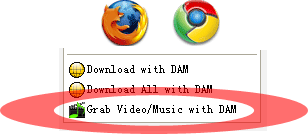
You may run MediaGrabber from Firefox, Chrome, IE context-menu (by right-click and choosing "Grab Video/Music with DAM" command), or the Tools menu of DAM by selecting "Launch MediaGrabber" menu item:
|
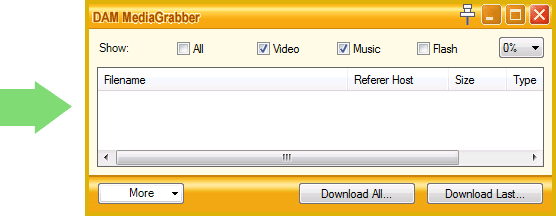
|
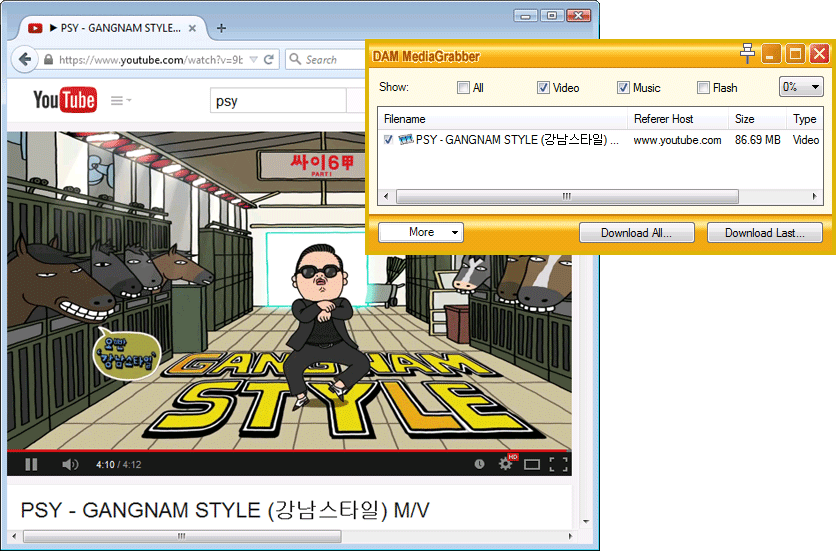
Step 2. Play media with your browser (if a media file has been playing prior the launch of MediaGrabber, refresh page)
You will find that the playing media file has been grabbed and added into MediaGrabber window:
Step 3. Click Download button in MediaGrabber
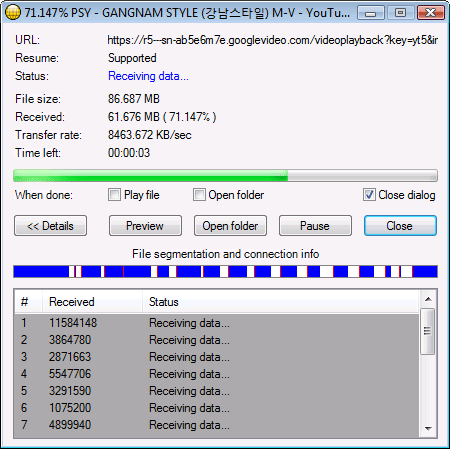
Select captured media files in the MediaGrabber window, then click "Download Last" or "Download All" button, DAM will download the selected media for you.
How to play the downloaded videos or music?
- You DON'T need any media converter software! Don't waste your time in converting your downloaded media files into other formats again and again, from using those "downloader and converter" applications, all you need is a media player that supports the needed media codec (like MP4, WebM, FLV, etc.)! A popular media player, such as VLC Media Player, is free and will play those media files for you!
Tips
- 1. You may run MediaGrabber before playing media files with your browser.
- 2. In order for MediaGrabber to show any captured video files, you must select Video type in the MediaGrabber window
- 3. If MediaGrabber misses grabbing a media file, you may refresh the webpage and play the media file again, to re-capture the file; you may also restart MediaGrabber or your web browser to see if this helps.
- 4. To grab videos from your browser, you must have proper browser monitoring settings with MediaGrabber. For example, if you use Firefox browser, then Firefox option must be selected at Options->Monitoring.
- 5. Other download managers could block MediaGrabber from grabbing Web media; uninstalling those software would help your computer
- Read more tips...
DAM helps you download videos music from virtually any sites in any browsers