|
Download Accelerator Manager (DAM) is the ideal AOL downloader tool that lets you download AOL videos, music, movies, songs etc, easily at the fastest possible speeds! Download videos, music, movies, songs etc from AOL and virtually any media sites - only with Download Accelerator Manager (DAM)! Get started
DAM works best with the popular Firefox and Chrome browsers.
On AOL site, MediaGrabber works with any browsers. Tip: The newest DAM offers you a powerful tool--MediaGrabber--that is capable of capturing videos and music from the latest Firefox and Chrome browsers with DAM Extension enabled. See DAM in action - as easy as 1-2-3!
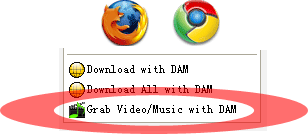
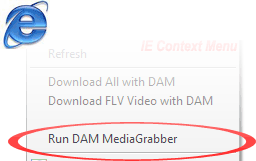
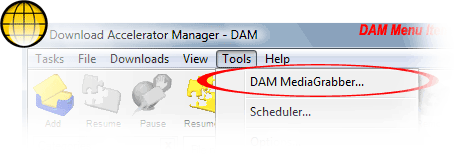
Step 1. Launch MediaGrabber (only if you haven't) You may run DAM MediaGrabber from Firefox, Chrome and IE context-menu (by right-click and choosing "Grab Video/Music with DAM" command), or the Tools menu of DAM by selecting "Launch MediaGrabber" menu item:
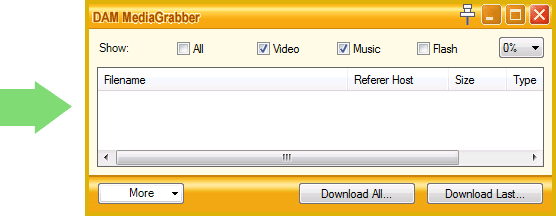
Step 2. Play media with your browser You will find that the playing media file has been captured and added into MediaGrabber window (if a media file has been playing prior the launch of MediaGrabber, refresh page):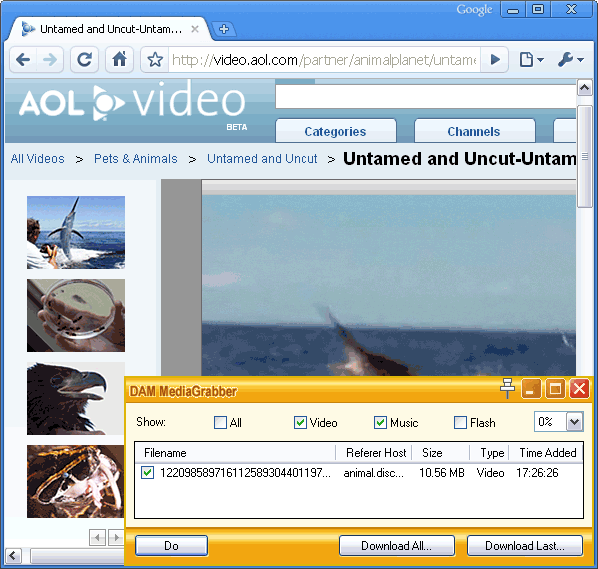
Step 3. Click Download button Select grabbed media files in the DAM MediaGrabber window, then click "Download Last" or "Download All" (Ultimate version) button, DAM will download the selected media for you.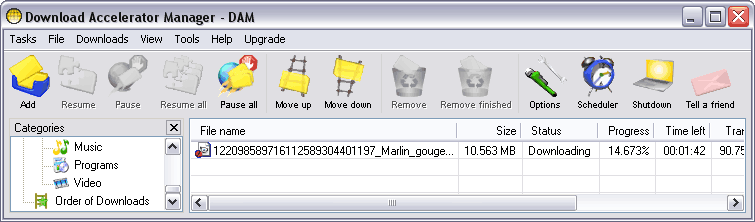 How to play the downloaded videos, music, movies, songs etc?
Tips
Download Accelerator Manager (DAM) helps you
Download videos from virtually any sites by using DAM
The above images/downloads are for testing purposes. We're not responsible for the contents posted on the third-party sites.
|